
This is a quick tutorial on how to make a full screen Custom Dialog with Circular Reveal Animation which I used in my recent app List it. Reveal is a new animation introduced in Android L.
Note: This animation require minimum SdkVersion 21.
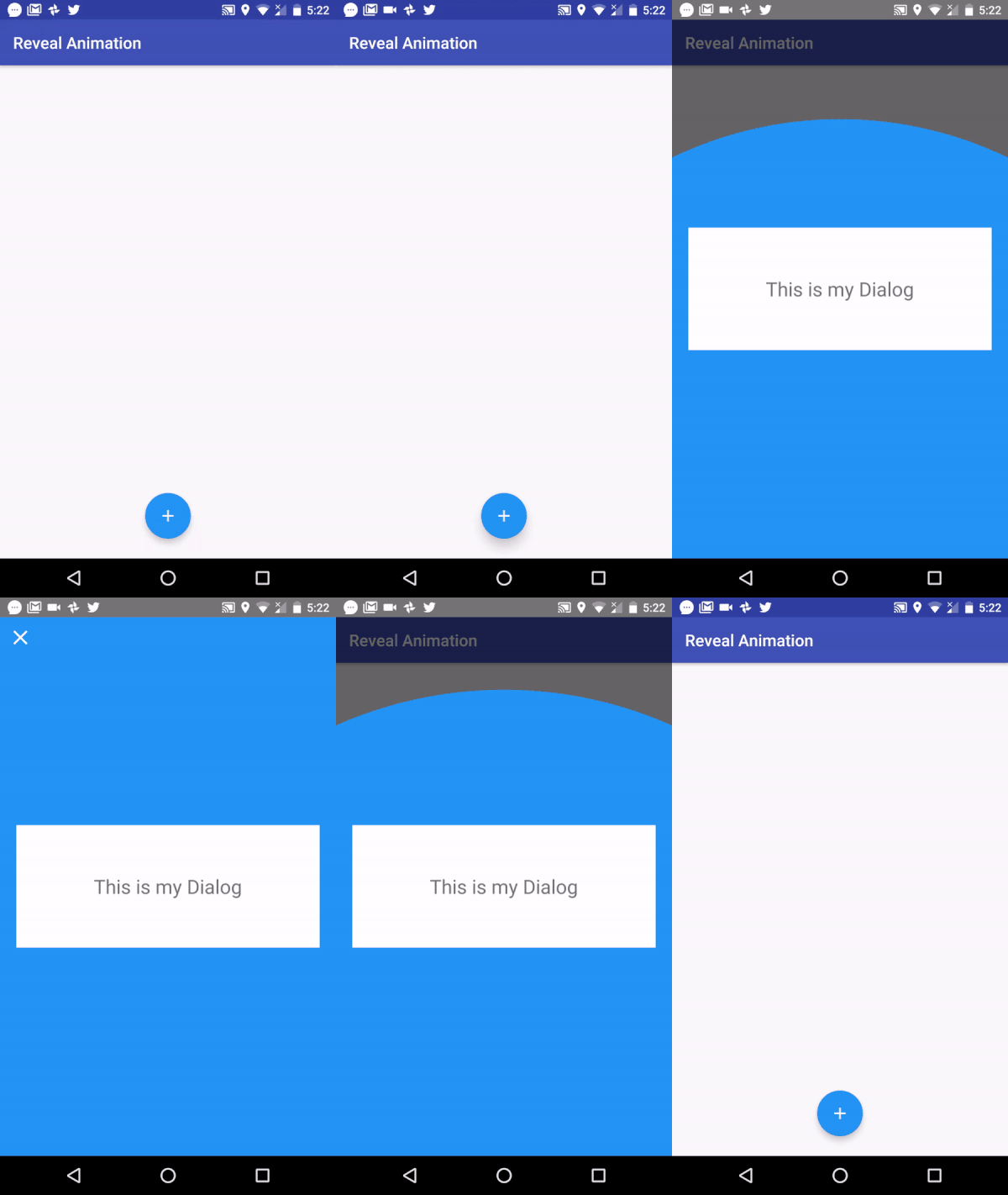
First we will create a layout for our dialog and MainActivity.
dialog.xml
activity_main.xml
Now all we have to do in java code is show the dialog on click of our FloatingActionButton.
FloatingActionButton fab;
    @Override
    protected void onCreate(Bundle savedInstanceState) {
        super.onCreate(savedInstanceState);
        setContentView(R.layout.activity_main);

fab = (FloatingActionButton)findViewById(R.id.fab);
        fab.setOnClickListener(new View.OnClickListener() {
            @Override
            public void onClick(View v) {

showDiag();
            }
        });
    }
Now we will create a method showDiag. In dialog.setOnShowListener we will call method revealShow(). revealShow() takes 3 arguments -your dialog view, boolean value (which will be true for opening the dialog and false when you close the dialog) and Dialog.
private void showDiag() {

final View dialogView = View.inflate(this,R.layout.dialog,null);

final Dialog dialog = new Dialog(this,R.style.MyAlertDialogStyle);
    dialog.requestWindowFeature(Window.FEATURE_NO_TITLE);
    dialog.setContentView(dialogView);

ImageView imageView = (ImageView)dialog.findViewById(R.id.closeDialogImg);
    imageView.setOnClickListener(new View.OnClickListener() {
        @Override
        public void onClick(View v) {

revealShow(dialogView, false, dialog);
        }
    });

dialog.setOnShowListener(new DialogInterface.OnShowListener() {
        @Override
        public void onShow(DialogInterface dialogInterface) {
            revealShow(dialogView, true, null);
        }
    });

dialog.setOnKeyListener(new DialogInterface.OnKeyListener() {
        @Override
        public boolean onKey(DialogInterface dialogInterface, int i, KeyEvent keyEvent) {
            if (i == KeyEvent.KEYCODE_BACK){

revealShow(dialogView, false, dialog);
                return true;
            }

return false;
        }
    });

dialog.getWindow().setBackgroundDrawable(new ColorDrawable(android.graphics.Color.TRANSPARENT));

dialog.show();
}
Here comes the main part where we will code for circular reveal animation.
private void revealShow(View dialogView, boolean b, final Dialog dialog) {

final View view = dialogView.findViewById(R.id.dialog);

int w = view.getWidth();
    int h = view.getHeight();

int endRadius = (int) Math.hypot(w, h);

int cx = (int) (fab.getX() + (fab.getWidth()/2));
    int cy = (int) (fab.getY())+ fab.getHeight() + 56;

if(b){
        Animator revealAnimator = ViewAnimationUtils.createCircularReveal(view, cx,cy, 0, endRadius);

view.setVisibility(View.VISIBLE);
        revealAnimator.setDuration(700);
        revealAnimator.start();

} else {

Animator anim =
                ViewAnimationUtils.createCircularReveal(view, cx, cy, endRadius, 0);

anim.addListener(new AnimatorListenerAdapter() {
            @Override
            public void onAnimationEnd(Animator animation) {
                super.onAnimationEnd(animation);
                dialog.dismiss();
                view.setVisibility(View.INVISIBLE);

}
        });
        anim.setDuration(700);
        anim.start();
    }

}
style.xml
@color/colorPrimary

@color/colorPrimaryDark

@color/colorAccent

@color/colorAccent

false

@color/colorAccent
Here is a github repository. https://github.com/divyanshub024/RevealAnimation
Comment down below for any question.